Wherein Is Revealed the Cunning Art of Filtering Without Betraying the OUTER JOIN
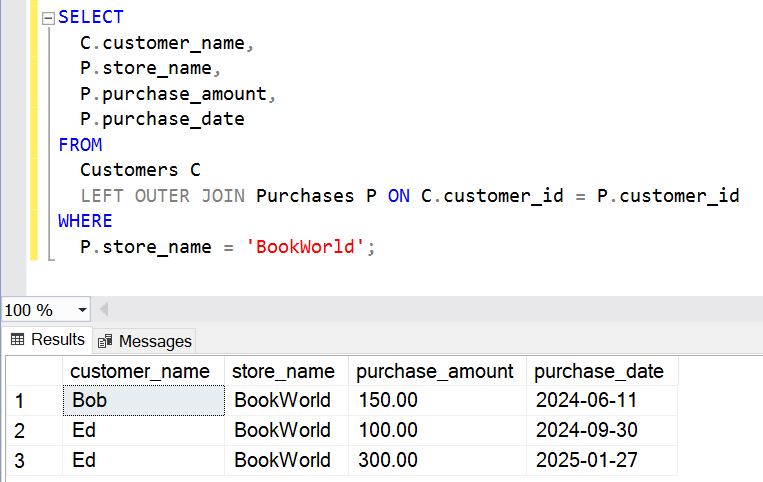
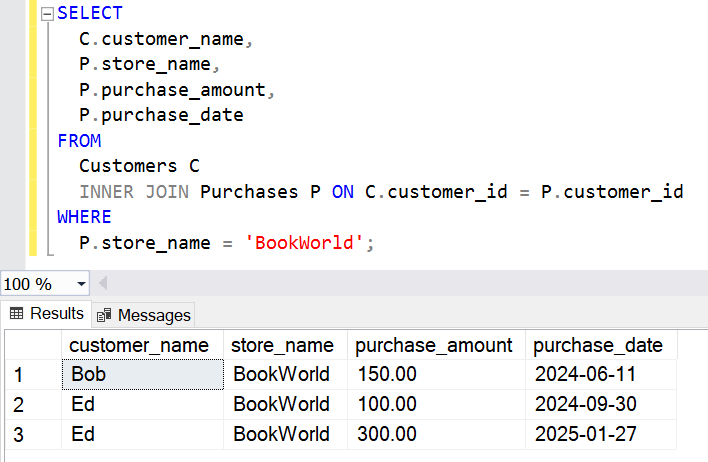
In my last post, we looked at how a WHERE clause can cause an OUTER JOIN to return unexpected results, and sometimes data you thought would come back may be missing altogether.
Luckily, if you are looking for a way to apply a degree of filtering to an OUTER JOIN whilst still maintaining its ability to retain all rows from one or both sides of the join, there is a solution. It doesn’t make use of the WHERE clause though; instead the work is done in the ON clause of the join itself.
This may feel unintuitive if you are used to using the ON clause purely to specify the source columns or expressions you wish to match on to join datasets. For OUTER JOINs however it can be utilised as a filter, one which will be applied DURING the processing of the join. This is different to a WHERE clause which as we’ve learnt comes into play AFTER the join.
Some words about the ON clause
Before diving into examples, here are key points about ON in SQL joins:
The ON clause of a JOIN in a SQL statement is simply a conditional BOOLEAN check, just like in other languages.
For a join to be successful, the overall result of the ON conditional check must evaluate to TRUE.
An ON condition is not limited to comparisons of column values between two tables, it can include expressions too!
Source data
Time for some examples. We’ll go back to our test datasets:
dbo.Customers| customer_id | customer_name | customer_tier |
|---|---|---|
| 1 | Alice | bronze |
| 2 | Bob | silver |
| 3 | Charlie | gold |
| 4 | Danielle | gold |
| 5 | Ed | gold |
| purchase_id | customer_id | store_name | purchase_date | purchase_amount |
|---|---|---|---|---|
| 1 | 1 | AutoFix | 2025-01-02 | 100.00 |
| 2 | 2 | AutoFix | 2024-12-20 | 200.00 |
| 3 | 2 | BookWorld | 2024-06-11 | 150.00 |
| 4 | 4 | AutoFix | 2025-01-03 | 250.00 |
| 5 | 5 | BookWorld | 2024-09-30 | 100.00 |
| 6 | 5 | BookWorld | 2025-01-27 | 300.00 |
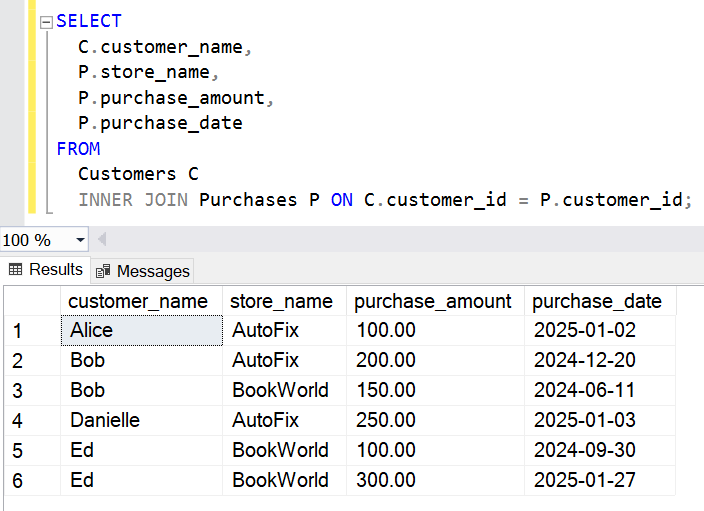
To better get a feel for the data, we’ll join these tables together with a LEFT OUTER JOIN and no filtering:
SELECT
  C.customer_name,
  P.store_name,
  P.purchase_amount,
  P.purchase_date
FROM
  Customers C
  LEFT OUTER JOIN Purchases P ON C.customer_id = P.customer_id;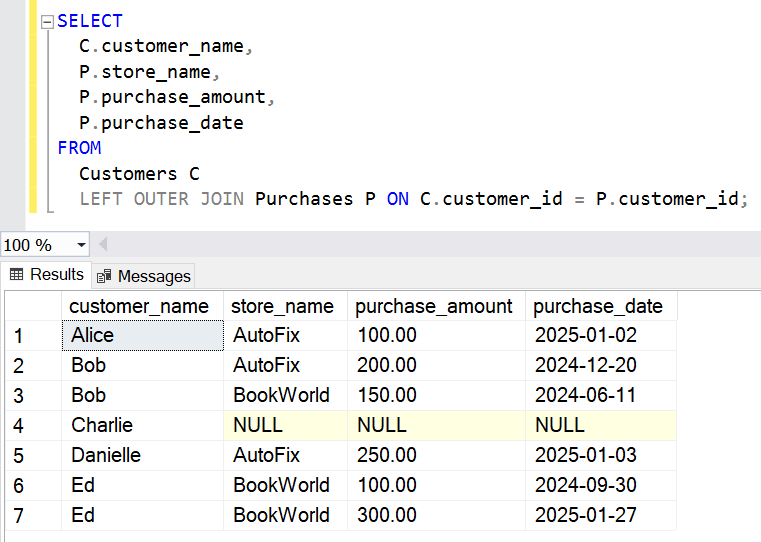
Worked examples using ON filtering
Let’s delve into the filtering we can achieve in an OUTER JOIN, using the ON clause instead of WHERE.
Example 1: I want to see a list of ALL customers, but only the purchases from AutoFix.
SELECT
  C.customer_name,
  P.store_name,
  P.purchase_amount,
  P.purchase_date
FROM
  Customers C
  LEFT OUTER JOIN Purchases P ON C.customer_id = P.customer_id
  AND P.store_name = 'AutoFix';
You can immediately see here how we’ve tweaked the JOIN. We still have our LEFT OUTER JOIN between the Customers and Purchases tables using the common customer_id solumn.
What’s new is the second condition. Instead of another column match, it is an expression, one which will only be TRUE for Purchases rows where the store_name is ‘AutoFix’.
Once again, remember that the ON clause is a conditional, and a join will only succeed if the combination of the clauses evaluates to TRUE.
The workflow of this query can be read as:
Fetch ALL rows from the Customers table.
Perform a LEFT OUTER JOIN where the overall results of the following tests evaluates to TRUE:
- A row from the Customers table has the same customer_id value as a row from the Purchases table
- AND – that row from the Purchases table must have a store_name column value of ‘Autofix’
The result is:
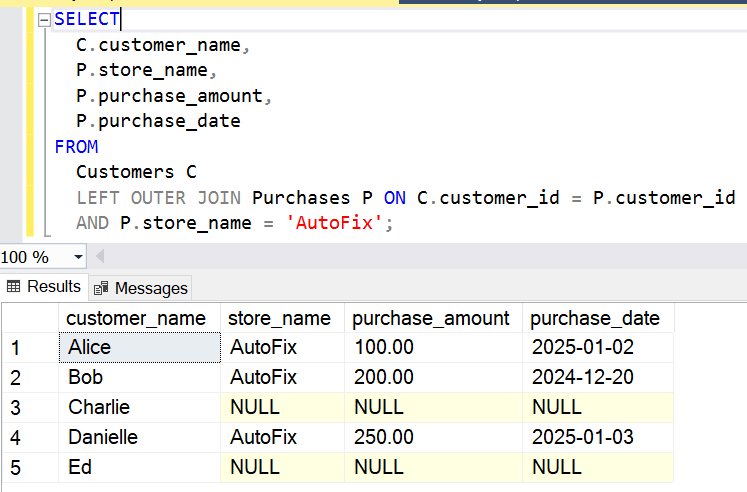
This data still looks like it’s from an OUTER JOIN doesn’t it? Charlie has made no purchases, so we see NULLS for him. More interesting though is Ed’s row with NULLs. He has made purchases but NONE from AutoFix.
If we were using the WHERE clause to filter the dataset for AutoFix purchases, neither Charlie or Ed would appear in the output. Instead, by moving that filter into the ON clause, we have taken finer-grained control of our filtering and produced a potentially more useful and insightful dataset.
For the sake of completeness and before we move into some other examples, let’s see what this query pattern would return if we filter on a store which doesn’t have any recorded purchases.
Example 2: I want to see a list of ALL customers, but only the purchases from CookieLand.
SELECT
  C.customer_name,
  P.store_name,
  P.purchase_amount,
  P.purchase_date
FROM
  Customers C
  LEFT OUTER JOIN Purchases P ON C.customer_id = P.customer_id
  AND P.store_name = 'CookieLand';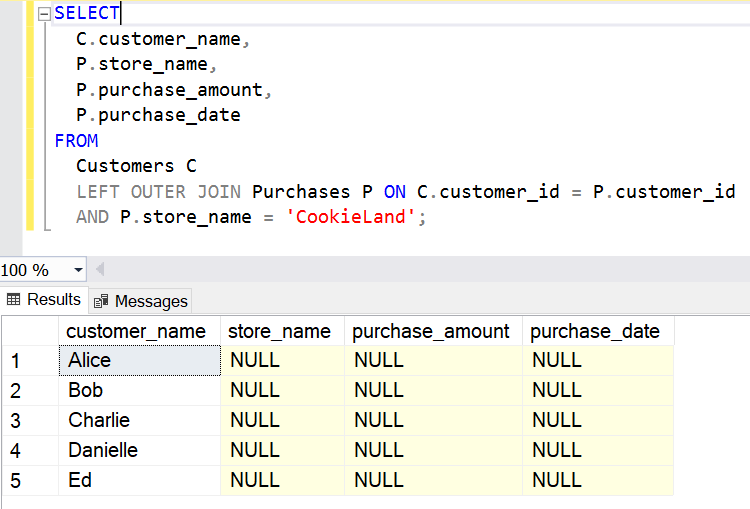
We still see each and every customer, but CookieLand really needs to up its advertising spend.
You can get some interesting results if you perform ON filtering on the left-hand table of a LEFT OUTER JOIN. All rows from the left-hand table will be returned, but the join to the right-hand table will only succeed where the join condition is matched.
Example 3: I want to see a list of ALL customers, but only the purchases made by ‘gold’-tier customers.
SELECT
  C.customer_name,
  C.customer_tier,
  P.store_name,
  P.purchase_amount,
  P.purchase_date
FROM
  Customers C
  LEFT OUTER JOIN Purchases P ON C.customer_id = P.customer_id
  and C.customer_tier = 'gold';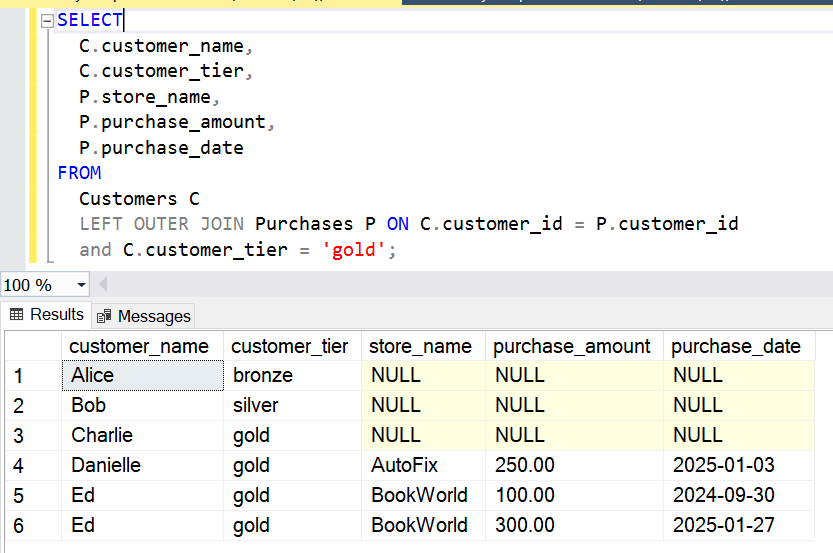
We’ve used an expression to filter data from the left-side Customers table of the LEFT OUTER JOIN instead of the right. This is perfectly valid syntax. Again we have two expressions, the customer_id column match AND the customer_tier = ‘gold’ expression.
In this query the Customers table is NOT actually being filtered at all. We see ALL rows from that table, with no NULLs in the customer_name or customer_tier columns. Rather the LEFT OUTER JOIN is only making successful matches to the Purchases table (and thereby only bringing back data from the Purchases table) for instances where the ON clause evaluates to TRUE. We will only ever see Purchases data where there is a matching customer_id column value, and the customer is gold-tier.
To complete the picture, note that even though Charlie is a gold-tier customer, he has made no purchases. This means that his customer_id doesn’t appear in the Purchases table, so the ON conditional can only evaluate as FALSE for him.
The conditional checks in an ON clause must in combination evaluate to TRUE, but we’re not just restricted to ANDs to combine them.
Example 4: I want to see a list of ALL customers, but only the purchases made at AutoFix, OR by ‘gold’-tier customers.
SELECT C.customer_name
	,C.customer_tier
	,P.store_name
	,P.purchase_amount
	,P.purchase_date
FROM Customers C
LEFT OUTER JOIN Purchases P ON C.customer_id = P.customer_id
	AND (
		P.store_name = 'AutoFix'
		OR C.customer_tier = 'gold'
		);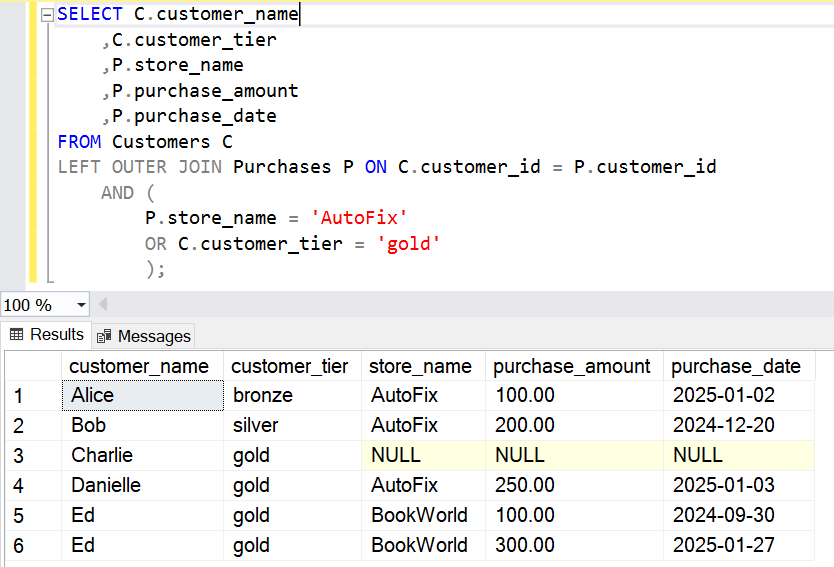
Again, we are simply adding to the set of expressions which must in combination evaluate to TRUE for the join to succeed. In this case we’re adding conditions to both the left AND right tables in the join.
We can even use date range filters in our ON clauses.
Example 5: I want to see a list of ALL customers, but only the purchases made at BookWorld prior to 2025-01-01.
SELECT C.customer_name
	,P.store_name
	,P.purchase_amount
	,P.purchase_date
FROM Customers C
LEFT OUTER JOIN Purchases P ON C.customer_id = P.customer_id
	AND P.store_name = 'BookWorld'
	AND P.purchase_date < '2025-01-01';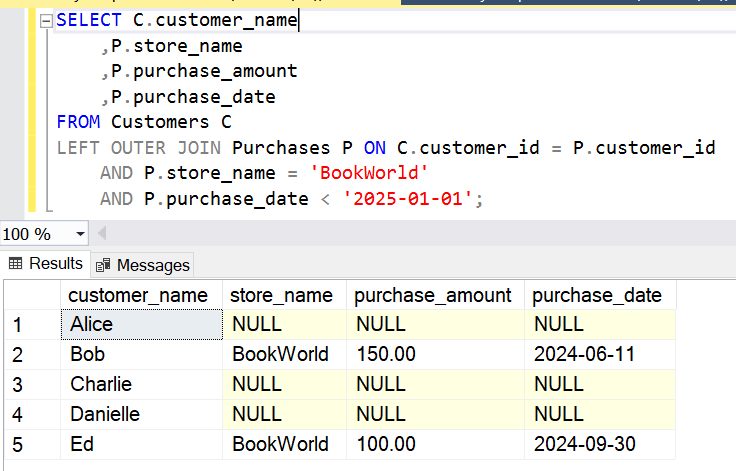
Key Takeaways
- Filtering using the ON clause allows you to control which rows successfully join, as opposed to which rows are filtered in the final output.
- In the case of a LEFT OUTER JOIN for example, ON filtering controls which rows from the right-hand table appear, without filtering rows from the left-hand table.
- You can use combinations of multiple conditions in your ON clause (similar to those in a WHERE Clause) to exercise fine-grained control over which rows from the right-hand table appear, whilst keeping all of the left-hand table data.
By mastering the use of ON clause filtering in OUTER joins, you can unlock new ways of shaping your datasets with just a few lines of SQL! It’s a perfect solution for reporting-style queries where you need fine-grained filtering while still ensuring you see all rows from one side of your source datasets.
The demo SQL code for this blog post is available below.
/*
DISCLAIMER:
The scripts provided in this blog post are for educational and demonstration purposes only.
They are provided "as-is" without warranty of any kind, either expressed or implied,
including but not limited to the implied warranties of merchantability or fitness for a
particular purpose. Use these scripts at your own risk.

The author is not responsible for any data loss, corruption, or system issues that may
arise from running these scripts in any environment. Please ensure to test these scripts
thoroughly in a non-production environment before using them in production systems.

The scripts are designed for SQL Server and may require adjustments for other database systems.
Please review and modify as needed to suit your specific use case.
*/

/*
https://shanedriscoll.com/sql/filtering-outer-joins-via-on/
*/

DROP TABLE IF EXISTS
  dbo.Purchases;

DROP TABLE IF EXISTS
  dbo.Customers;

/* Customers Table */
CREATE TABLE
  dbo.Customers (
    customer_id INT PRIMARY KEY,
    customer_name VARCHAR(100),
    customer_tier VARCHAR(100)
  );

/* Purchases Table */
CREATE TABLE
  dbo.Purchases (
    purchase_id INT PRIMARY KEY,
    customer_id INT,
    store_name VARCHAR(100),
    purchase_date DATE,
    purchase_amount DECIMAL(10, 2),
    FOREIGN KEY (customer_id) REFERENCES Customers (customer_id)
  );

/* Insert Customers */
INSERT INTO
  Customers (customer_id, customer_name, customer_tier)
VALUES
  (1, 'Alice', 'bronze'),
  (2, 'Bob', 'silver'),
  (3, 'Charlie', 'gold'),
  (4, 'Danielle', 'gold'),
  (5, 'Ed', 'gold');

/* Insert Purchases (Bob and Ed have purchases at multiple stores) */
INSERT INTO
  Purchases (
    purchase_id,
    customer_id,
    store_name,
    purchase_date,
    purchase_amount
  )
VALUES
  (1, 1, 'AutoFix', '2025-01-02', 100.00),
  (2, 2, 'AutoFix', '2024-12-20', 200.00),
  (3, 2, 'BookWorld', '2024-06-11', 150.00),
  (4, 4, 'AutoFix', '2025-01-03', 250.00),
  (5, 5, 'BookWorld', '2024-09-30', 100.00),
  (6, 5, 'BookWorld', '2025-01-27', 300.00);

/* LEFT OUTER JOIN with no filtering */
SELECT
  C.customer_name,
  P.store_name,
  P.purchase_amount,
  P.purchase_date
FROM
  Customers C
  LEFT OUTER JOIN Purchases P ON C.customer_id = P.customer_id;

/* Example 1: I want to see a list of ALL customers, but only the purchases from AutoFix. */
SELECT
  C.customer_name,
  P.store_name,
  P.purchase_amount,
  P.purchase_date
FROM
  Customers C
  LEFT OUTER JOIN Purchases P ON C.customer_id = P.customer_id
  AND P.store_name = 'AutoFix';

/* Example 2: I want to see a list of ALL customers, but only the purchases from CookieLand. */
SELECT
  C.customer_name,
  P.store_name,
  P.purchase_amount,
  P.purchase_date
FROM
  Customers C
  LEFT OUTER JOIN Purchases P ON C.customer_id = P.customer_id
  AND P.store_name = 'CookieLand';

/* Example 3: I want to see a list of ALL customers, but only the purchases made by ‘gold’-tier customers. */
SELECT
  C.customer_name,
  C.customer_tier,
  P.store_name,
  P.purchase_amount,
  P.purchase_date
FROM
  Customers C
  LEFT OUTER JOIN Purchases P ON C.customer_id = P.customer_id
  and C.customer_tier = 'gold';

/* Example 4: I want to see a list of ALL customers, but only the purchases made at AutoFix, OR by ‘gold’-tier customers. */
SELECT C.customer_name
	,C.customer_tier
	,P.store_name
	,P.purchase_amount
	,P.purchase_date
FROM Customers C
LEFT OUTER JOIN Purchases P ON C.customer_id = P.customer_id
	AND (
		P.store_name = 'AutoFix'
		OR C.customer_tier = 'gold'
		);

/* Example 5: I want to see a list of ALL customers, but only the purchases made at BookWorld prior to 2025-01-01.  */
SELECT C.customer_name
	,P.store_name
	,P.purchase_amount
	,P.purchase_date
FROM Customers C
LEFT OUTER JOIN Purchases P ON C.customer_id = P.customer_id
	AND P.store_name = 'BookWorld'
	AND P.purchase_date < '2025-01-01';

/* Cleanup */
DROP TABLE dbo.Purchases;

DROP TABLE dbo.Customers;