
Of OUTER JOINs, their promises, and the sly WHERE clause that steals them away.
I often forget the finer details around the behaviours of SQL OUTER JOINs where filtering is applied in the ON or WHERE clauses. Over the years I’ve noticed it’s a common area of confusion for many developers too. It’s not surprising. The behaviour isn’t always the most intuitive, and a LEFT OUTER join can be harder to picture as clearly in your mind’s eye than the more simple INNER JOIN.
Let’s get into the OUTER JOIN weeds a little (for a couple of posts) to get to grips with things, and along the way we may come across some easy ways to solve querying challenges which might be new to you. In any case, I’m looking forward to having some of my own documentation to refresh my memory with in future!
Looking at LEFT OUTER JOINs, in plain language the workflow could be described as:
Return ALL rows from the left-hand table. If there’s a match in the right-hand table based on the join condition, include the right-hand table data. If there’s no match, fill in NULLs for the right-hand table’s columns.
Our source data
Consider 2 source tables which contain this data:
dbo.Customers| customer_id | customer_name | customer_tier |
|---|---|---|
| 1 | Alice | bronze |
| 2 | Bob | silver |
| 3 | Charlie | gold |
| 4 | Danielle | gold |
| 5 | Ed | gold |
| purchase_id | customer_id | store_name | purchase_date | purchase_amount |
|---|---|---|---|---|
| 1 | 1 | AutoFix | 2025-01-02 | 100.00 |
| 2 | 2 | AutoFix | 2024-12-20 | 200.00 |
| 3 | 2 | BookWorld | 2024-06-11 | 150.00 |
| 4 | 4 | AutoFix | 2025-01-03 | 250.00 |
| 5 | 5 | BookWorld | 2024-09-30 | 100.00 |
| 6 | 5 | BookWorld | 2025-01-27 | 300.00 |
This data is quite straightforward. 5 customers and the purchases they’ve made across 2 different stores. Note that Charlie hasn’t actually made any purchases at all. Not much point demonstrating LEFT OUTER JOINs without NULLs is there?
OUTER JOINs and WHERE example
I commonly see confusion about what happens when you filter a LEFT OUTER JOIN with a WHERE clause. People start out with good intentions about using an OUTER join to bring back every row from the table on the left side of the LEFT OUTER JOIN, but things then go off the rails when a WHERE filter on the right side of the join is introduced.
Let’s demonstrate. We’ll start by getting a look at all the data by LEFT OUTER JOINing dbo.Customers to dbo.Purchases, without any filtering.
SELECT
  C.customer_name,
  P.store_name,
  P.purchase_amount,
  P.purchase_date
FROM
  Customers C
  LEFT OUTER JOIN Purchases P ON C.customer_id = P.customer_id;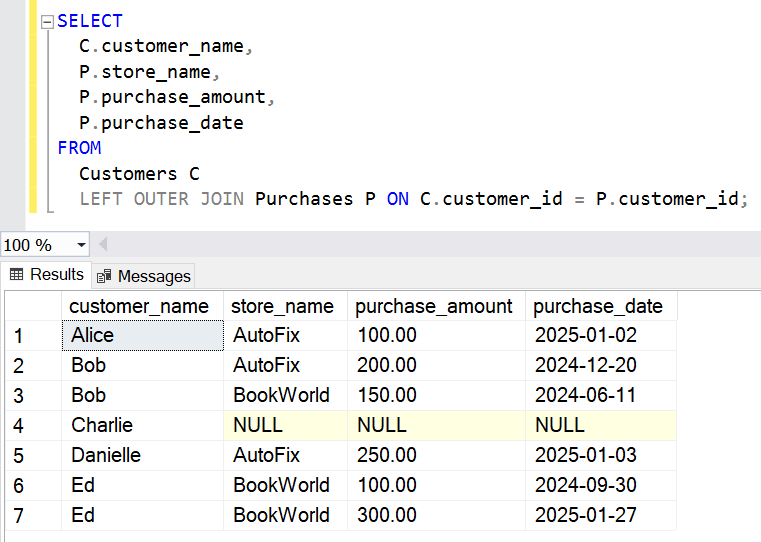
This looks good so far. All customers are there, and Charlie has NULL purchase values. Now let’s add a WHERE filter to this query to only return rows for purchases from BookWorld.
SELECT
  C.customer_name,
  P.store_name,
  P.purchase_amount,
  P.purchase_date
FROM
  Customers C
  LEFT OUTER JOIN Purchases P ON C.customer_id = P.customer_id
WHERE
  P.store_name = 'BookWorld';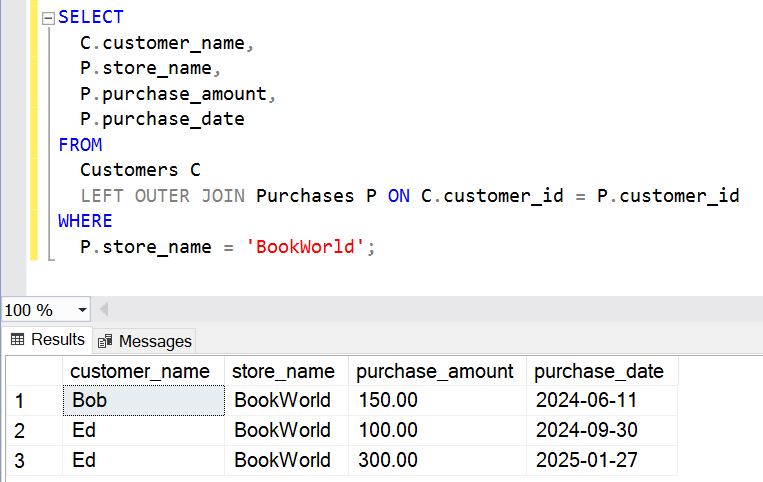
Maybe the developer wanted the data to look like this, maybe not. It could be that with a LEFT OUTER JOIN they were expecting all of the dbo.Customers rows to be returned but only with purchase information from BookWorld. In any case, we don’t see all of the customers anymore.
To understand what happened, let’s look at the general order in which database engines will process parts of a SQL query:
- FROM (including JOINs and ON)
- WHERE
- GROUP BY
- HAVING
- SELECT
- ORDER BY
- LIMIT / TOP
- OFFSET
Each of these steps are logically performed in order as shown, with each step passing on the intermediate resultset to the next step upon completion.
So in the query above:
- The LEFT OUTER JOIN has been computed first, bringing back all of the customers as expected in an intermediate resultset.
- The WHERE clause has come along next and done precisely what it was asked to do; it has filtered the resultset and dutifully returned ONLY rows where the P.store_name column has the value ‘BookWorld’.
- Thus the NULLs from the Purchases table have been filtered out, and the OUTER JOIN goodness has gone!
Therefore with the added WHERE clause above, the workflow has effectively changed to:
Return ALL rows from the left-hand table. If there’s a match in the right-hand table based on the join condition, include the right-hand table data. If there’s no match, fill in NULLs for the right-hand table’s columns.
After that, drop ALL rows where the P.store_name column isn’t ‘BookWorld’ (including NULLs).
INNER JOINs and WHERE example
What we now have is more like a plain old INNER JOIN. To illustrate, let’s perform the same steps with an INNER JOIN as those joins are generally simpler to follow. Let’s INNER JOIN dbo.Customers to dbo.Purchases, without any filtering.
SELECT
  C.customer_name,
  P.store_name,
  P.purchase_amount,
  P.purchase_date
FROM
  Customers C
  INNER JOIN Purchases P ON C.customer_id = P.customer_id;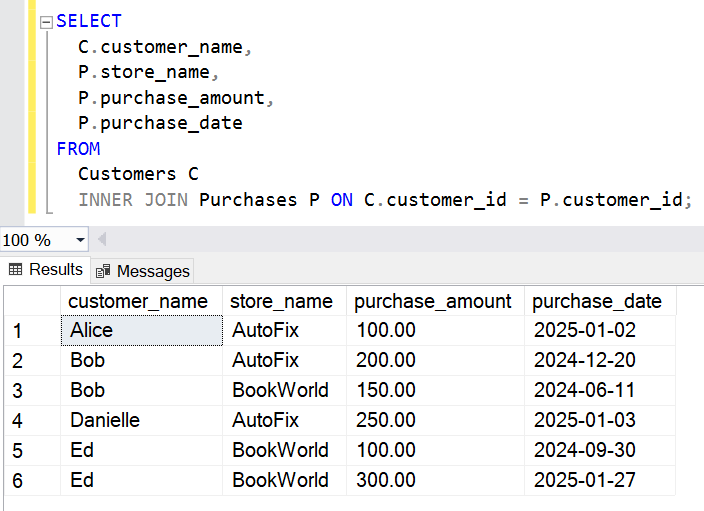
We see Charlie missing here right from the initial JOIN step, which is to be expected with an INNER JOIN.
SELECT
  C.customer_name,
  P.store_name,
  P.purchase_amount,
  P.purchase_date
FROM
  Customers C
  INNER JOIN Purchases P ON C.customer_id = P.customer_id
WHERE
  P.store_name = 'BookWorld';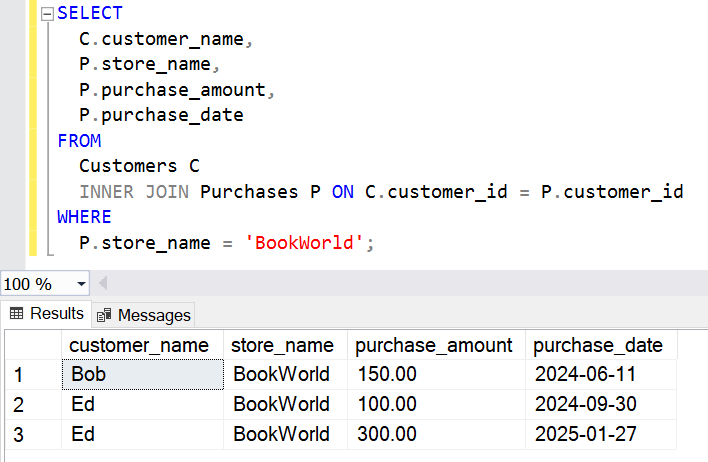
No surprises with the WHERE filter here. Any rows where the P.store_name is not ‘BookWorld’ have been removed. The final dataset is in fact the same as the LEFT OUTER JOIN query version after the WHERE filter was added.
Key takeaways
- WHERE filters results AFTER all joins have been made.
- A non-NULL WHERE filter will remove NULLs, including those which come from an OUTER JOIN.
- A WHERE filter which filters NULLs could undo what you may have been intending to achieve with a LEFT OUTER JOIN in the first place!
In the next blog post in this series we’ll look into how we can safely and predictably perform resultset “filtering”, whilst still maintaining the OUTER JOIN functionality where all rows are returned from at least one side of the join.
The demo SQL code for this blog post is available below.
/*
DISCLAIMER:
The scripts provided in this blog post are for educational and demonstration purposes only.
They are provided "as-is" without warranty of any kind, either expressed or implied,
including but not limited to the implied warranties of merchantability or fitness for a
particular purpose. Use these scripts at your own risk.

The author is not responsible for any data loss, corruption, or system issues that may
arise from running these scripts in any environment. Please ensure to test these scripts
thoroughly in a non-production environment before using them in production systems.

The scripts are designed for SQL Server and may require adjustments for other database systems.
Please review and modify as needed to suit your specific use case.
*/

/*
https://shanedriscoll.com/outer-join-plus-where-filter-equals-not-so-outer-join/
*/

DROP TABLE IF EXISTS
  dbo.Purchases;

DROP TABLE IF EXISTS
  dbo.Customers;

/* Customers Table */
CREATE TABLE
  dbo.Customers (
    customer_id INT PRIMARY KEY,
    customer_name VARCHAR(100),
    customer_tier VARCHAR(100)
  );

/* Purchases Table */
CREATE TABLE
  dbo.Purchases (
    purchase_id INT PRIMARY KEY,
    customer_id INT,
    store_name VARCHAR(100),
    purchase_date DATE,
    purchase_amount DECIMAL(10, 2),
    FOREIGN KEY (customer_id) REFERENCES Customers (customer_id)
  );

/* Insert Customers */
INSERT INTO
  Customers (customer_id, customer_name, customer_tier)
VALUES
  (1, 'Alice', 'bronze'),
  (2, 'Bob', 'silver'),
  (3, 'Charlie', 'gold'),
  (4, 'Danielle', 'gold'),
  (5, 'Ed', 'gold');

/* Insert Purchases (Bob and Ed have purchases at multiple stores) */
INSERT INTO
  Purchases (
    purchase_id,
    customer_id,
    store_name,
    purchase_date,
    purchase_amount
  )
VALUES
  (1, 1, 'AutoFix', '2025-01-02', 100.00),
  (2, 2, 'AutoFix', '2024-12-20', 200.00),
  (3, 2, 'BookWorld', '2024-06-11', 150.00),
  (4, 4, 'AutoFix', '2025-01-03', 250.00),
  (5, 5, 'BookWorld', '2024-09-30', 100.00),
  (6, 5, 'BookWorld', '2025-01-27', 300.00);

/* LEFT OUTER JOIN with no filtering */
SELECT
  C.customer_name,
  P.store_name,
  P.purchase_amount,
  P.purchase_date
FROM
  Customers C
  LEFT OUTER JOIN Purchases P ON C.customer_id = P.customer_id;

/* LEFT OUTER JOIN with WHERE filter */
SELECT
  C.customer_name,
  P.store_name,
  P.purchase_amount,
  P.purchase_date
FROM
  Customers C
  LEFT OUTER JOIN Purchases P ON C.customer_id = P.customer_id
WHERE
  P.store_name = 'BookWorld';

/* INNER JOIN with no filtering */
SELECT
  C.customer_name,
  P.store_name,
  P.purchase_amount,
  P.purchase_date
FROM
  Customers C
  INNER JOIN Purchases P ON C.customer_id = P.customer_id;

/* INNER JOIN with WHERE filter */
SELECT
  C.customer_name,
  P.store_name,
  P.purchase_amount,
  P.purchase_date
FROM
  Customers C
  INNER JOIN Purchases P ON C.customer_id = P.customer_id
WHERE
  P.store_name = 'BookWorld';

/* Cleanup */
DROP TABLE dbo.Purchases;

DROP TABLE dbo.Customers;
Leave a Reply